

Download DBeaver – free multi‑platform database tool
Overview
DBeaver is a powerful, open‑source database management solution that brings the convenience of a full‑featured IDE to developers, DBAs, analysts, and anyone who works with data. Built on the Eclipse platform and written in Java, DBeaver supports more than 80 relational and NoSQL databases through native JDBC drivers or proprietary adapters. Whether you are connecting to MySQL, PostgreSQL, Oracle, SQLite, SQL Server, DB2, or newer cloud‑native stores, DBeaver offers a consistent, user‑friendly interface that feels like a spreadsheet for data manipulation while still providing deep inspection tools for schema design, query optimization, and security management.
The community edition is completely free, regularly updated, and backed by an active developer community that contributes plugins, extensions, and detailed documentation. For enterprises that need advanced security, technical support, and additional productivity features, a commercial Enterprise edition is also available under a commercial license. DBeaver’s strength lies in its universality—one download works across Windows, macOS, Linux, and even mobile platforms via remote connections—making it an ideal “write once, run anywhere” solution for mixed‑environment environments.
The tool’s intuitive layout, drag‑and‑drop editors, and built‑in data visualisation panels reduce the learning curve for newcomers while still satisfying power users who demand fine‑grained control over every aspect of their database interactions.
Key Features
- Universal Database Support: Native JDBC drivers for over 80 databases, plus custom drivers for niche systems.
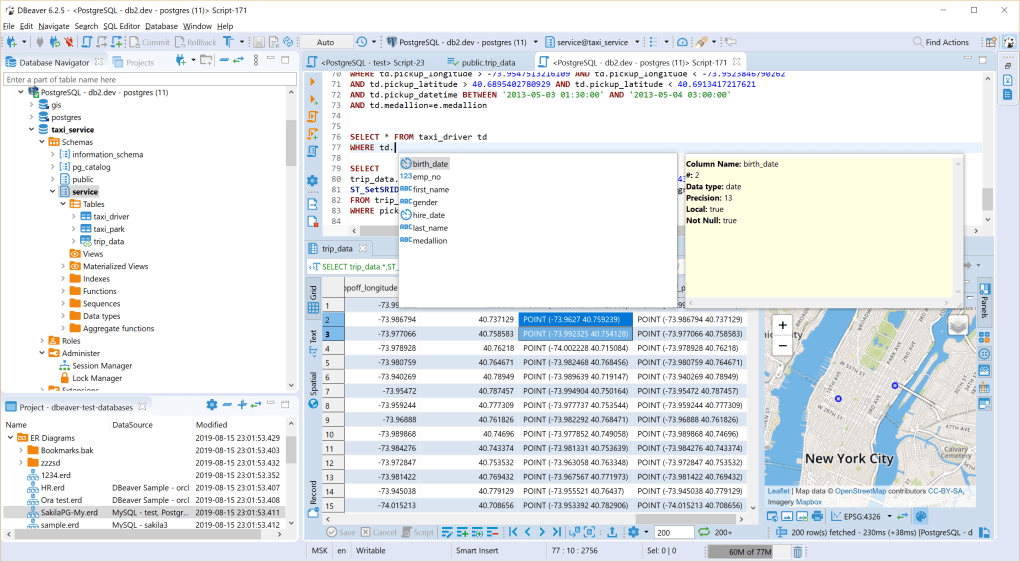
- SQL Editor with Autocomplete: Syntax highlighting, code completion, and execution history accelerate query development.
- Data Grid & Spreadsheet View: Edit, filter, sort, and export data directly from a familiar grid interface.
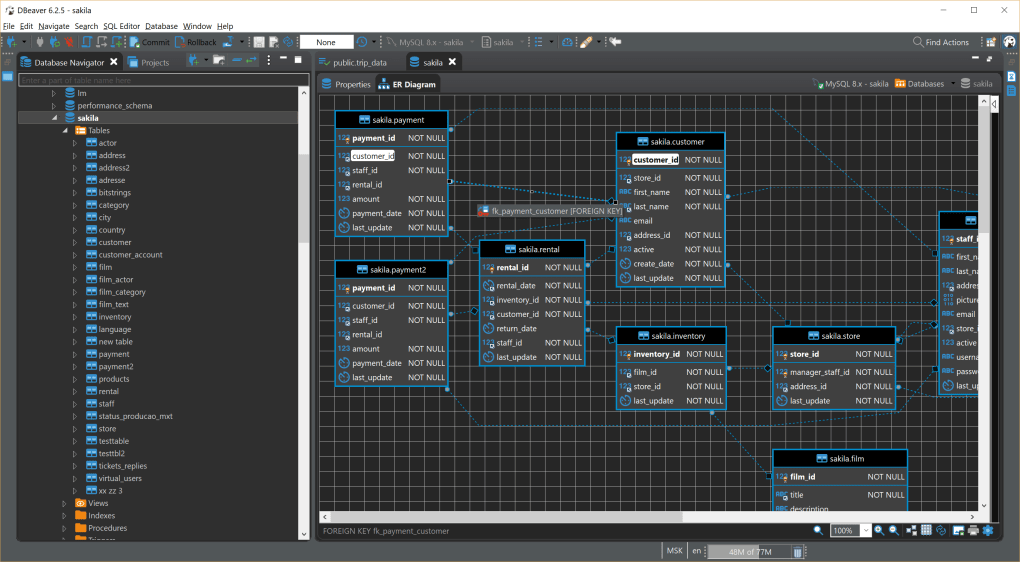
- ER Diagram Generator: Visualise table relationships and generate schema diagrams on the fly.
- Database Navigator & Object Explorer: Hierarchical browsing of schemas, tables, views, procedures, and security roles.
- Import/Export Wizards: Seamlessly move data between CSV, Excel, JSON, XML, and database formats.
- Plugin Architecture: Extend functionality with community‑created plugins for version control, data masking, and more.
- Cross‑Platform UI: Consistent look and feel on Windows, macOS, and Linux, powered by SWT.
- Secure Connections: SSH tunnelling, SSL/TLS, and Kerberos support for encrypted database access.
- Task Automation: Schedule scripts, generate reports, and integrate with CI/CD pipelines via command‑line interface.
Installation, Usage & Compatibility
Step‑by‑Step Installation
Installing DBeaver is straightforward on all major operating systems. For Windows users, download the installer (.exe) from the official website, run it, and follow the wizard prompts—accept the license, choose an installation folder, and optionally create a desktop shortcut. macOS users can grab the DMG package, drag the DBeaver icon into the Applications folder, and launch it from Launchpad. Linux distributions provide both a DEB and RPM package; install via sudo dpkg -i dbeaver-ce_*.deb or sudo rpm -i dbeaver-ce-*.rpm. Advanced users may prefer the portable ZIP archive, which extracts to any directory without requiring administrative rights. After installation, the first launch will prompt you to configure a workspace directory—this is where preferences, connection profiles, and project files are stored.
Getting Started with a New Connection
Once DBeaver is open, click the “New Database Connection” button on the toolbar. A wizard appears, listing all supported drivers. Select your database type (e.g., PostgreSQL), then enter the hostname, port, database name, username, and password.
Test the connection to verify credentials; if the test succeeds, click “Finish” to save the profile. DBeaver automatically creates a tree view under the “Database Navigator” panel, where you can explore tables, indexes, and stored procedures. Right‑click any object to open the context menu—options include “View Data,” “Edit,” “Generate SQL,” and “Export.” For complex queries, open the SQL Editor, type your statement, and hit Ctrl + Enter to execute.
Results appear in a grid that supports inline editing, copy‑to‑clipboard, and export to Excel or CSV with a single click.
Operating System Compatibility
DBeaver runs on all major desktop platforms because it is built on Java and the Eclipse Rich Client Platform. Officially supported operating systems include:
- Windows 10, 11 (both 64‑bit and 32‑bit)
- macOS 10.14 (Mojave) and later, including Apple Silicon (via Rosetta 2 or native ARM builds)
- Linux distributions such as Ubuntu, Fedora, Debian, openSUSE, and CentOS (both DEB and RPM packages)
The same application can also be run on headless servers using the command‑line version (dbeaver-cli), which is handy for automated scripts or CI pipelines. Because DBeaver relies on JDBC, you only need a compatible Java Runtime Environment (JRE 8 or newer) installed on your system; the installer typically bundles a suitable JRE, so most users won’t have to manage Java themselves.
Pros, Cons & Frequently Asked Questions
Pros
- Free & Open‑Source: No licensing fees for the community edition, with full source code available.
- Broad Database Coverage: One tool for MySQL, PostgreSQL, Oracle, SQL Server, and many more.
- Rich UI Features: ER diagrams, data grids, and visual query builders improve productivity.
- Extensible Architecture: Plugins and custom drivers let you tailor the app to niche requirements.
- Cross‑Platform Consistency: Same experience on Windows, macOS, and Linux.
Cons
- Initial startup can be slower on low‑end hardware due to Java overhead.
- Complex UI may feel overwhelming for absolute beginners without prior SQL experience.
- Enterprise features (e.g., advanced security, premium plugins) require a paid license.
- Occasional UI freezes when loading very large result sets; manual refresh may be needed.
FAQ
Is DBeaver really free for commercial use?
Yes. The Community Edition is released under the Apache 2.0 license, which permits free use, modification, and distribution—including commercial projects. Only the Enterprise Edition carries a commercial license.
Can I connect to a cloud database like Amazon RDS or Google Cloud SQL?
Absolutely. DBeaver supports standard JDBC connections, so you can connect to any cloud‑hosted database that exposes a JDBC endpoint. You may need to configure SSL certificates or SSH tunnelling depending on your cloud provider’s security settings.
Does DBeaver have a built‑in data visualisation tool?
Yes. The “Data Editor” includes charting options (bar, line, pie) that can be generated directly from query results. For more advanced visualisation, you can export data to external tools such as Tableau or Power BI.
How does DBeaver handle version control for SQL scripts?
Through its Git integration plugin, DBeaver lets you commit, push, and pull SQL script files directly from the IDE. You can also view diffs and resolve conflicts without leaving the application.
Is there a way to automate routine tasks like nightly backups?
Yes. DBeaver’s command‑line interface (CLI) can be scheduled via cron (Linux/macOS) or Task Scheduler (Windows) to execute SQL scripts, export data, or generate reports automatically.
Conclusion & Call to Action
DBeaver stands out as a truly universal database tool that balances power and accessibility. Its free community edition already packs a rich set of features—SQL editing with autocomplete, data grid manipulation, ER diagram generation, and a thriving plugin ecosystem—making it a solid choice for developers, analysts, and DBAs alike. While the Java foundation can introduce a modest startup delay and the UI may initially appear dense, the extensive documentation and active community quickly mitigate these hurdles.
For teams that need advanced security, dedicated support, or proprietary connectors, the Enterprise edition offers a reasonable upgrade path without forcing anyone to abandon the free version. In short, if you are looking for a secure, cross‑platform, and feature‑rich database client that won’t break the bank, DBeaver deserves a spot on your development workstation. Download DBeaver today, connect to your first database, and experience a smoother workflow for all your data‑driven projects.







